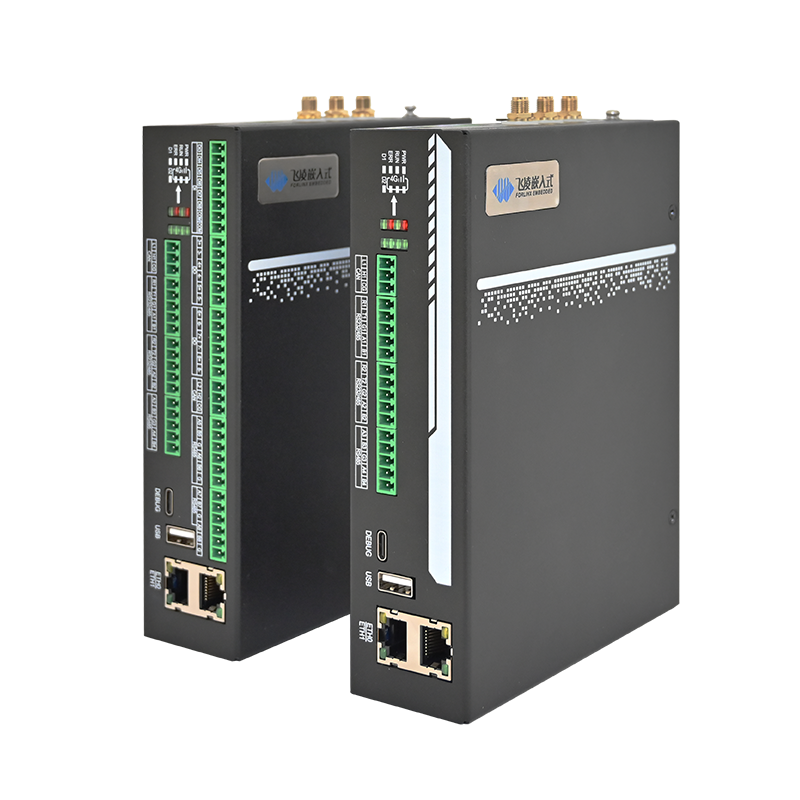

Creating an Industrial IoT Data Acquisition Gateway from Scratch using the Forlinx Embedded FCU1501 Embedded Control Unit
In industrial equipment data acquisition scenarios, this article discusses the Forlinx Embedded FCU1501 Control Unit and its supporting software for deployment and debugging, creating a practical Industrial IoT gateway.
Neuron is a lightweight, open-source edge protocol gateway software designed for the Industrial Internet of Things (IIoT). It addresses a core challenge in industrial settings: how to enable various industrial devices (such as PLCs, sensors) using different communication protocols to ''communicate'' with each other and uniformly upload data to cloud platforms.
In terms of architecture, Neuron acts as a protocol conversion bridge at the edge. It achieves multi-source data interconnection through the following core capabilities:
- Protocol Conversion: Supports converting dozens of industrial protocols such as Modbus, OPC UA, Siemens S7 into standard MQTT messages, enabling seamless data upload to the cloud or integration with other systems;
- Multi-Device Access: Supports simultaneous connection and management of hundreds to thousands of devices from different brands, achieving one-stop data acquisition;
- Ultra-Lightweight Deployment: Entirely developed in C, it has extremely low resource consumption and can run natively or containerized on various edge hardware such as X86 and ARM;
- Open and Flexible: Open-source under the LGPL license, it provides a web interface for visual configuration and management, facilitating user operation and secondary development.
The following is a complete hardware practical tutorial: Connecting a rail-mounted Modbus temperature and humidity transmitter (RS-485, Modbus-RTU protocol) to the RS485_5 serial port of the FCU1501, configuring the southbound driver through Neuron, and collecting real-time raw temperature and humidity data.
1. Downloading and Installing Neuron
This hands-on guide uses the open-source Neuron version 2.x. While versions 3.x and above have transitioned to a commercial license, Neuron 2.15.0, released under the LGPL license, still offers a complete open-source community ecosystem and high stability. It has also been meticulously optimized for resource usage on lightweight, low-power embedded hardware like the FCU1501.
Visit the official GitHub repository: https://github.com/emqx/neuron;
Download the installation package adapted for the 32-bit ARM architecture: neuron-2.15.0-linux-armhf.tar.gz;
After extracting the file to the FCU1501 device, modify the configuration file to enable external network access vi /root/neuron/config/neuron.json
Modification: Change the ip parameter in the configuration to 0.0.0.0.Complete Configuration Reference:
{
"ip": "0.0.0.0",
''port": 7000,
''disable_auth": 0
}
Navigate to the Neuron program directory and execute the background startup command:
./neuron -d
After the startup, you can open the login page by accessing the device IP followed by port 7000 in a browser. Default username/password: admin / 0000. After logging in, you can modify account permissions and parameters as needed.
2. Hardware Preparation and Wiring
Required Equipment List:
FCU1501 Embedded Control Unit (Expansion version, equipped with RK3506J processor, Linux 6.1);
Rail-mounted Modbus Temperature & Humidity Transmitter (RS-485 interface, Modbus-RTU protocol, default baud rate: 9600bps, address: 1).
The FCU1501 Embedded Control Unit (Expansion version) is equipped with 8 independent RS485 serial ports. This tutorial uses the RS485_5 channel, which corresponds to the system node /dev/ttyCH334_1 (refer to FCU1501 Hardware Manual §2.11.2).
Wiring Correspondence:
| Temperature and Humidity Transmitter Pins | FCU1501 RS485 _5 |
| A(485+) | A5 |
| B(485-) | B5 |
| GND | G5 |
3. Identifying Serial Devices
After SSH login to FCU1501, first check if the serial port device is recognized:
root@FCU1501:~# ls /dev/ttyCH334*
/dev/ttyCH334_0 /dev/ttyCH334_1 /dev/ttyCH334_2 /dev/ttyCH334_3
In the output list,/dev/ttyCH334_1is the RS485_5 serial port channel used for this operation.
4. Configuring Modbus-RTU Southbound Device in Neuron
Add Southbound Driver Device
In the left menu bar, select 【Southbound Device】 - 【Add Device】, and fill in the parameters:
Device Name: Temperature & Humidity Transmitter (customizable)
Plugin Type: Modbus-RTU
Serial Port Path: /dev/ttyCH334_1
Baud Rate: 9600 (matches the sensor's factory settings)
Data Bits: 8
Stop Bits: 1
Parity: None
The device default address is 1. If the sensor's address or baud rate has been modified previously, the configuration parameters need to be adjusted accordingly (refer to Temperature & Humidity Transmitter Manual §1.1).
Create Data Group and Collection Points
Select the newly created ''Temperature & Humidity Transmitter'' device, enter the Data Group page, create a new data group named ''Temperature and Humidity Data'' (Temperature & Humidity Data), then add collection points. Configure the register parameters according to Temperature & Humidity Transmitter Manual §3.1.
Then, add points (i.e., register addresses) within the data group:
According to Temperature & Humidity Transmitter Manual §3.1, the register addresses are as follows:
| Point Name | Register Address Identifier | Read/Write Attribute | Data Type | Conversion Factor | Description |
| Temperature | 1!40002 | Read | INT16 | 0.1 | Actual temperature (°C) = measured value × 0.1 |
| Humidity | 1!40001 | Read | INT16 | 0.1 | Actual humidity (° C) = acquired value × 0.1 |
Start Device Data Collection
After configuration, click the Start button on the device list page. Neuron will begin reading data from the sensor according to the set collection cycle.
5. Real-time Data Verification
Once the device is running, navigate to the corresponding data group page and click 【View Data】 (or similar). The page will continuously refresh, displaying the real-time collected temperature and humidity values, confirming the data link is functioning correctly.
6. Common Operational Issues and Precautions
R485 Wiring Fault: Reversing the A and B signal lines will directly cause communication failure. You can try swapping the two lines or use a multimeter to check for line continuity;
Serial Port Parameter Mismatch: The sensor's factory baud rate is 9600 bps. If you have modified the device parameters, the serial port baud rate, parity bit, and address configured in Neuron must match (refer to Transmitter Manual §3.2);
Negative Temperature (Below 0°C) Parsing: When the ambient temperature is below 0°C, the value is stored in the register in two's complement format. The read data must be parsed as a signed INT16 integer (refer to Transmitter Manual §3.4).
7. Summary
This hands-on tutorial successfully established a connection between the FCU1501 and a Modbus-RTU temperature and humidity sensor using the RS485_5 serial port. By utilizing Neuron, we configured the southbound driver, collected data points, and performed real-time data reading. This process fully validated two key advantages:
FCU1501's Multiple RS485 Serial Ports can flexibly adapt to various types of terminal devices in industrial settings, ensuring stable and reliable communication;
Neuron's Lightweight Edge Gateway Software offers comprehensive compatibility with the Modbus-RTU industrial protocol, making it simple to set up and configure.
After completing local data collection, you can proceed to configure Neuron's northbound MQTT application to upload the temperature and humidity data to a cloud platform, building a complete remote-monitoring industrial IoT data acquisition solution.